
Understanding Android System Issues
Android system issues can happen for many reasons. Sometimes the problem appears after a failed software update, while in other cases it may be caused by malware, corrupted files, accidental settings changes, or hardware stress. Common Android system problems include devices getting stuck in recovery mode, phones restarting repeatedly, applications crashing continuously, touchscreens becoming unresponsive, and operating systems freezing during use. In severe cases, the phone may not boot properly at all.
These system errors can affect users differently depending on the model of the phone and the version of Android installed. Older devices may become slower over time due to storage overload and outdated software. Newer devices may also encounter problems after installing unstable applications or unofficial modifications. Since Android is used by many different smartphone brands, troubleshooting problems manually can sometimes become difficult for average users. This is why software repair tools have become popular for solving Android-related issues quickly and efficiently.
What Is DroidKit?
DroidKit is an Android troubleshooting and repair tool designed to help users recover data, unlock devices, repair operating system problems, and manage Android systems more effectively. The software is mainly used on computers and works by connecting an Android phone through a USB cable. Once connected, the tool scans the device and offers different repair or recovery options depending on the detected problem.
One of the reasons DroidKit has gained attention is because it combines multiple Android management functions into a single platform. Instead of using different software tools for data recovery, screen unlocking, system repair, and file extraction, users can access many features in one place. This makes the process simpler for people who may not have professional technical experience.
How DroidKit Repairs Android System Problems
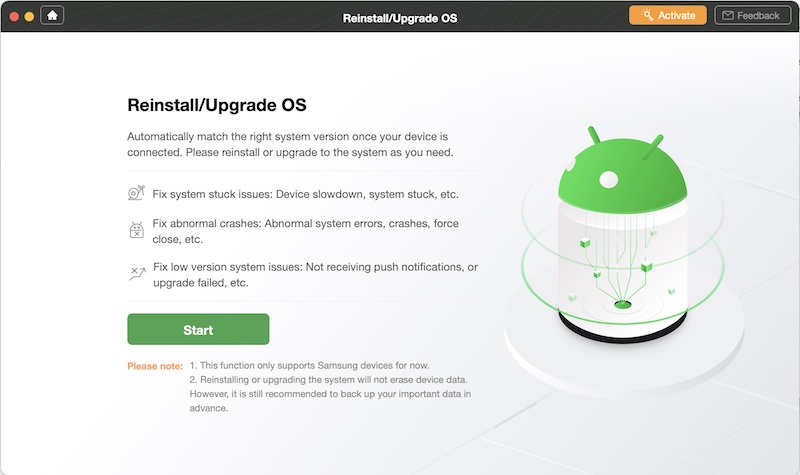
One of the main functions of DroidKit is system repair. The software is designed to identify certain Android operating system problems and apply repair solutions automatically. When a device is stuck on the startup logo, trapped in a boot loop, or experiencing repeated crashes, DroidKit attempts to repair the system files responsible for the issue.
The repair process usually starts by placing the Android phone into a special recovery or download mode. After this, the software downloads compatible firmware or repair packages required for the device model. These files help replace damaged or corrupted system components that may be causing the problem. Once the repair package is installed, the device may restart normally if the process is successful.
This automated repair method can be useful because manual Android repairs often require technical commands, flashing tools, or firmware installation procedures that can confuse average users. DroidKit simplifies these tasks into guided steps that are easier to follow.
Common Android Problems DroidKit Can Fix
DroidKit is commonly promoted as a solution for several Android system issues. One of the most common problems it addresses is boot loop errors. A boot loop happens when a phone continuously restarts without reaching the main home screen. This issue can occur after failed updates or software corruption.
Another issue DroidKit may help solve is a frozen system screen. Sometimes Android devices stop responding completely, making normal navigation impossible. The software can attempt to repair the operating system so the device becomes functional again.
Black screen problems are also common among Android users. In some situations, the phone powers on but shows no display output. DroidKit may repair software-related causes of black screen errors if the issue is not related to damaged hardware.
System crashes and app instability are additional problems that users often face. Corrupted system files can cause apps to close unexpectedly or prevent Android from functioning smoothly. DroidKit attempts to repair these damaged files to improve overall system stability.
Some users also use DroidKit to exit recovery mode or remove devices stuck on the Android logo screen. These problems can make a device appear unusable, especially for people unfamiliar with Android troubleshooting techniques.
Additional Features Beyond System Repair
Besides fixing system issues, DroidKit also offers several additional tools that increase its usefulness for Android users. One major feature is data recovery. If users accidentally delete photos, messages, contacts, or videos, the software may help recover some of the lost files depending on the situation.
Another useful feature is screen unlocking. Some users forget their device passwords or screen lock patterns. DroidKit includes functions that may help unlock supported Android devices under certain conditions.
The software also provides data extraction tools that allow users to retrieve files from damaged or inaccessible devices. This can be valuable when users cannot access their phone normally but still want to save important information.
System cleaning and optimization features are also available. These functions help remove unnecessary files, improve storage management, and optimize device performance. Although these features may not solve serious system problems, they can help improve the overall user experience.
Advantages of Using DroidKit
One advantage of DroidKit is its user-friendly design. Many Android repair methods require technical skills, but DroidKit simplifies the repair process with step-by-step instructions. This makes it easier for beginners to attempt Android repairs safely.
Another benefit is the all-in-one approach. Instead of downloading multiple Android management tools, users can access several functions from a single platform. This saves time and reduces confusion.
Compatibility is another important factor. DroidKit supports many Android brands and models, allowing a wide range of users to try the software. Since Android devices vary greatly between manufacturers, broad compatibility is valuable.
The software can also save users from unnecessary repair costs. Some minor system issues can be fixed at home without visiting a phone technician. This may help users avoid spending money on simple software-related problems.
Limitations and Important Considerations
Although DroidKit can repair many software-related Android problems, it is important to understand that no repair tool guarantees success in every situation. Some system issues may be caused by physical hardware damage rather than software corruption. For example, water damage, broken internal components, or battery failures usually cannot be repaired through software alone.
Users should also understand that certain repair processes may involve resetting the device or reinstalling system files. In some cases, this could lead to data loss if backups are not available. Creating backups before performing repairs is always recommended whenever possible.
Compatibility limitations may also exist for certain Android versions or brands. While DroidKit supports many devices, not every repair feature works on every phone model. Users should check whether their device is supported before starting the repair process.
Internet access may also be required because repair packages often need to be downloaded online. Stable computer and USB connections are important to avoid interruptions during repairs.
Is DroidKit Safe to Use?
Safety is a major concern for users who install third-party repair software. DroidKit is generally designed to perform repair operations through guided procedures rather than risky manual modifications. However, users should still download software only from official and trusted sources to avoid security risks.
Following instructions carefully is also important because disconnecting the device during repairs may create additional problems. Like other Android repair tools, DroidKit works best when users carefully follow the recommended steps and understand the repair process before beginning.
Conclusion
DroidKit can help fix many Android system issues, especially software-related problems such as boot loops, frozen screens, system crashes, black screens, and startup errors. The software is designed to simplify Android troubleshooting for users who may not have advanced technical knowledge. With features like system repair, data recovery, screen unlocking, and device optimization, DroidKit offers a wide range of tools in one platform. While it cannot solve every problem, especially hardware-related damage, it may provide an effective solution for many common Android issues. Users who face operating system problems on their Android devices often consider DroidKit because it combines convenience, automation, and multiple repair functions into a single repair environment.
