
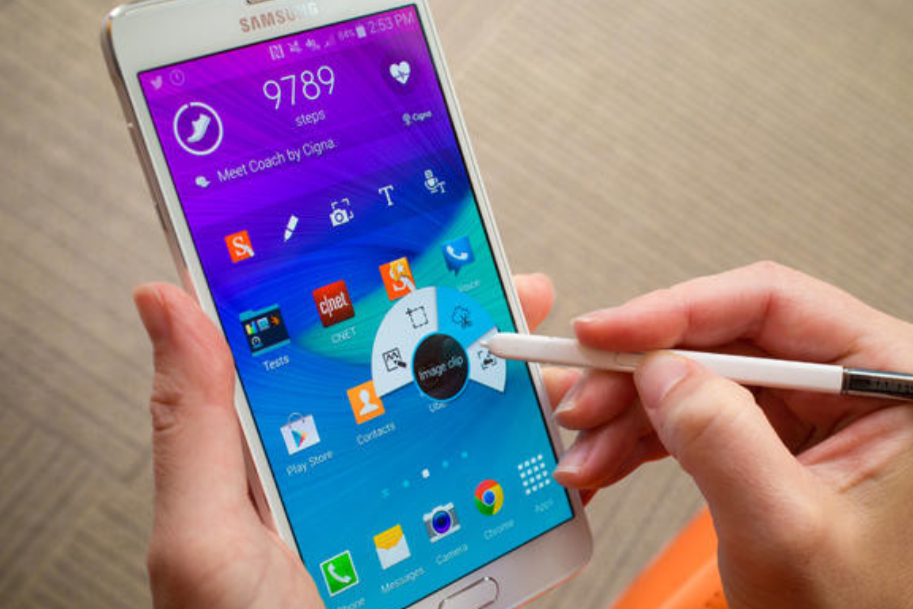
Imagine carrying a tiny computer, camera, map, music player, and game console — all in one small device that fits in your hand. That device is a smartphone. But what is a smartphone exactly, and why do we call it a pocket computer? This guide explains it simply, with real-life examples and helpful tips.
Quick answer: what is a smartphone?
A smartphone is a mobile phone that works like a small computer. It can make calls and send messages, but it also runs apps, connects to the internet, takes photos, plays music and video, and helps with tasks like navigation, shopping, and schoolwork.
Why smartphones matter
Smartphones changed how people work, learn, and connect. Instead of having many tools (camera, map, alarm clock), most people now use one device that does them all. That makes life faster, more connected, and — sometimes — a bit more distracting.
How a smartphone is different from a basic mobile phone
- Touchscreen — Most smartphones use a touchscreen you tap and swipe to control.
- Apps — Phones can download apps (small programs) from app stores to do almost anything.
- Powerful chips — Smartphones have processors and memory that let them run complex apps like games and video editors.
- Internet-first — They are made to use the internet often, through Wi-Fi or mobile data like 4G/5G.
- Sensors and cameras — Smartphones include GPS, cameras, fingerprint sensors, and more for added features.
Think of a basic phone as a simple toolbox with a few tools. A smartphone is a full workshop with many tools you can add and change.
Main parts of a smartphone (what makes it work)
Screen and Body
- Touchscreen display (LCD, OLED, or newer types)
- Body material (plastic, glass, metal)
Processor and Memory
- CPU (brain of the phone)
- RAM (short-term memory for running apps)
- Storage (where your photos and apps live)
Battery
- Rechargeable battery that lasts from a few hours to a full day or more, depending on use
Camera System
- One or more lenses (wide, ultra-wide, telephoto, macro)
- Useful for photos, video, and augmented reality apps
Connectivity
- Wi-Fi, Bluetooth, cellular networks (4G, 5G)
- GPS for location and maps
Operating System (OS)
- The main software that runs the phone, like iOS (Apple) or Android (Google)
Popular smartphone tasks — what people actually use them for
- Calling and texting — Still core functions.
- Social media — Apps like Instagram, Facebook, and TikTok.
- Navigation — Maps and GPS for directions.
- Photos and video — Quick capture, editing, and sharing.
- Entertainment — Streaming music and videos.
- Work and school — Email, documents, video calls, and calendars.
- Shopping — Online stores and mobile payment apps.
- Health tracking — Step counters and fitness apps.
Why the operating system matters: iOS vs. Android
- iOS (Apple): Smooth user experience, tight security, and regular updates. Works only on Apple devices.
- Android (Google): Flexible, lots of device choices and customizations. Many brands use Android.
Both are good. Choose iOS if you like a simple, controlled system. Choose Android if you want more options and control over the look and apps.
How smartphones became so powerful — a short history
- Early mobile phones (1980s–1990s): Big and used just for calls.
- Feature phones (2000s): Texting, simple games, small cameras.
- Smartphone era (late 2000s onward): Touchscreens, app marketplaces, and powerful processors. The 2007 iPhone and early Android phones helped start the modern smartphone age.
New tech you should know about
- 5G: Faster internet on the go, good for video, gaming, and fast downloads.
- AI (Artificial Intelligence): Helps with camera features, voice assistants, and smart suggestions.
- AR (Augmented Reality): Adds virtual images to the real world (used in games, shopping, and education).
- Foldable screens: Phones that open like a book to make a bigger display.
Practical tips: choosing a smartphone
- Set your budget — Phones range from budget to premium prices.
- Pick your ecosystem — If you already use Apple or Google services, stick to that OS for smoother syncing.
- Battery life — Look for 1-2 day battery life with your normal use.
- Camera quality — If you take lots of photos, compare camera specs and sample images.
- Storage — Choose enough space for apps, photos, and files; some phones have expandable storage.
- Durability — Consider water resistance and build material.
- Updates and support — Phones with frequent software updates stay safer longer.
Everyday examples: how a smartphone helps in real life
- Getting to school: Use maps for directions and public transport times.
- Homework: Look up facts, take notes, and join study groups.
- Keeping memories: Take photos and back them up to the cloud.
- Staying safe: Share location with family when traveling.
- Saving time: Mobile banking and quick online shopping.
Common problems and how to fix them
- Phone is slow: Close unused apps, free storage space, or restart the phone.
- Battery drains fast: Turn off unnecessary background apps, reduce screen brightness, or check battery settings.
- No internet: Switch between Wi-Fi and mobile data, or restart the router/phone.
- App crashes: Update the app or reinstall it.
FAQs — quick answers people ask
Q: What is a smartphone used for?
A: Many things — calls, messaging, internet, photos, games, navigation, and apps for tasks.
Q: Can a smartphone replace a computer?
A: For many people, yes. Smartphones can do email, web browsing, and document editing. But heavy tasks like professional video editing or large software development still work better on a computer.
Q: Is a more expensive phone always better?
A: Not always. Price often buys better cameras, faster chips, and build materials. But mid-range phones now offer excellent performance for everyday use.
Q: How do I keep my smartphone secure?
A: Use a strong passcode, biometric locks (fingerprint or face), install updates, and only download apps from official app stores.
Simple analogy to remember what a smartphone is
Think of a smartphone like a Swiss Army knife: one tool with many fold-out pieces. Instead of carrying a camera, a map, a music player, and a phone, you open one device and use the feature you need.
what is a smartphone, in one sentence
A smartphone is a compact, powerful device that mixes a phone and a small computer so you can call, learn, work, play, and connect — all from your pocket.
Final action: what to do next
- If you want a new phone, list the top three features you need (battery, camera, or speed) and set a budget.
- If you want to use your current phone better, try one new app this week that could save you time (a note app, map app, or cloud backup).
